Architectures, Patterns and Advanced Network Testing
- Refers to different architectural styles used in software systems, common design patterns, and advanced techniques for testing networked applications.
Monolithic Architecture
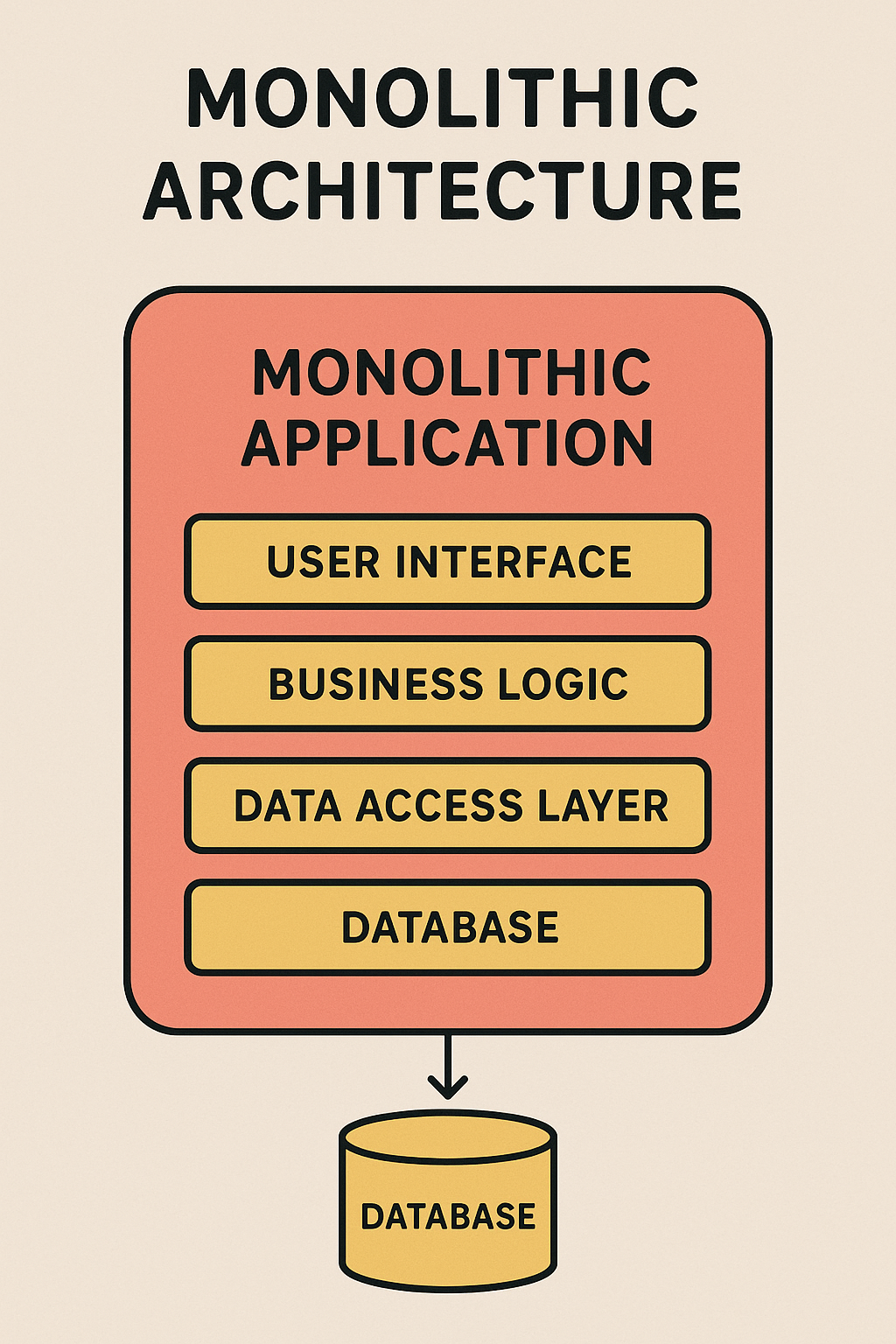
- Monolithic architecture is a traditional approach to software development where an application is built as a single, unified unit. All components, including the user interface (UI), business logic, and database access, are tightly integrated into one codebase and deployed as a single entity.
Characteristics of Monolithic Architecture
-
Single Codebase - All functionalities reside in one codebase.
-
Tightly Coupled Components - Modules are interconnected and dependent on each other.
-
Single Deployment Unit - The entire application is compiled, built, and deployed together.
-
Centralized Data Management - Typically uses a single relational database.
-
Simple Development and Deployment - Easier for small applications but challenging as the system grows.
Components of Monolithic Architecture
-
A typical monolithic application consists of:
-
Presentation Layer (UI) - Handles user interactions.
-
Business Logic Layer - Contains core functionality and rules.
-
Data Access Layer - Interacts with the database.
-
Database - Stores application data.
-
-
These components are packaged together into a single executable or deployment unit.
Advantages and Disadvantages of Monolithic Architecture
- Advantages
- Disadvantages
Simplicity in Development- Easier to develop and manage due to a single codebase.
Easy Debugging and Testing- Debugging and unit testing are straightforward since everything runs in one process.
Efficient Performance- No network latency between modules, as everything runs in the same memory space.
Simplified Deployment- Requires deploying a single artifact. ie: JAR or WAR file.
Better Development Tools Support- Well-supported by many frameworks. ie: Spring Boot, Laravel, or Django.
Scalability Challenges - Hard to scale specific components independently; requires scaling the entire application.
Slower Development with Growth - As the codebase grows, development becomes complex, leading to slower build times.
Harder Maintainability - Changes in one part may affect other modules, increasing risk.
Limited Flexibility - Technology stack is rigid; adopting new technologies requires major refactoring.
Deployment Issues - A small change requires redeploying the entire application, leading to downtime.
When to Use Monolithic Architecture
-
Monolithic architecture is suitable when:
-
The application is small to medium-sized.
-
There are limited development resources.
-
The application does not require frequent scaling.
-
The business logic is not too complex.
-
There is a need for quick development and deployment.
-
Challenges in Implementing Monolith
-
Tight Coupling - Components are strongly dependent on each other. A change in one module can affect many others. Hard to isolate issues or evolve parts independently.
-
Scalability Limitations - Difficult to scale individual parts of the application. You must scale the whole application, even if only one component ie: Search or Checkout needs more resources.
-
Slow Deployment Cycles - All features must be tested and deployed together. Small changes may require full redeployment. Increased risk of introducing regressions.
-
Complex Codebase Over Time - As more developers work on the monolith, it becomes harder to manage. Spaghetti code, duplication, and lack of clear ownership often emerge.
-
Difficult to Adopt New Technologies - Switching frameworks or languages requires rewriting large portions of the code. Hard to introduce modern patterns like event-driven or asynchronous processing.
-
Team Collaboration Issues - Large teams working in the same codebase may step on each other’s toes. Merges and conflicts increase, especially without good modular practices.
-
Limited Fault Isolation - A bug or failure in one component ie: Reporting can crash the entire application. Hard to ensure availability for critical parts while non-critical parts are failing.
-
Slow Startup Times - As the codebase grows, application startup time increases. This affects development speed and resilience ie: During container restarts.
-
Testing Challenges - Integration tests can be slow and hard to maintain. Unit tests may not give full confidence due to interdependencies.
Microservices Architecture
-
Microservices architecture is a design pattern that breaks down an application into smaller, independent services that are loosely coupled. Each service is focused on a specific business function, and services communicate with each other via lightweight protocols (typically HTTP / REST, or messaging queues).
-
Each microservice is self-contained, has its own codebase, database, and can be developed, deployed, and scaled independently.

Characteristics of Microservices Architecture
-
Decomposition - The application is split into several small, independent services, each responsible for a specific business domain.
-
Loose Coupling - Services are loosely coupled, meaning they are independent and can be developed, deployed, and scaled without affecting others.
-
Distributed Data Management - Each microservice may manage its own database or storage, allowing data to be partitioned based on service responsibility.
-
Independent Deployment - Each microservice can be deployed and updated independently of others.
-
Communication via APIs - Microservices communicate with each other using APIs, typically RESTful APIs or messaging systems like RabbitMQ or Kafka.
-
Resilience and Fault Tolerance - Microservices are designed to handle failure gracefully, with features like retries, timeouts, and circuit breakers.
-
Technology Agnostic - Each service can be built using different technologies ie: Programming languages and Databases suited to its specific needs.
Key Components of Microservices Architecture
-
Microservices - The independent services that perform specific business tasks.
-
API Gateway - A single entry point for all client requests, which routes requests to the appropriate microservice.
-
Service Registry - A central repository where services register themselves and discover other services.
-
Load Balancer - Distributes incoming requests to available instances of services.
-
Database per Service - Each microservice has its own database ie: SQL, NoSQL, or other data sources to encapsulate data and prevent tight coupling between services.
-
Inter-Service Communication - Typically achieved through RESTful APIs, gRPC, or asynchronous messaging ie: Kafka or RabbitMQ.
-
Monitoring and Logging - A distributed logging and monitoring system is crucial for tracing requests and managing microservices across multiple instances.
Advantages and Disadvantages of Microservices Architecture
- Advantages
- Disadvantages
Scalability - Services can be scaled independently based on demand. For instance, if one service requires more resources ie: High traffic, it can be scaled without affecting the entire application.
Flexibility in Technology Stack - Different services can use different technologies ie: Programming languages, and Databases best suited to their needs, offering more flexibility.
Faster Development and Deployment - Teams can work on individual services simultaneously without waiting for other parts of the application, resulting in faster development cycles.
Fault Isolation - If one service fails, it does not bring down the entire system. Other services can continue running, and failures can be handled gracefully.
Easier Maintenance and Updates - Services can be independently updated or refactored without impacting the entire application, allowing for faster innovation and better maintainability.
Continuous Delivery and Integration - Microservices support CI / CD pipelines, allowing for frequent and independent releases of services, improving the time-to-market for new features.
Complexity in Management - With many services running independently, the complexity of managing deployments, configuration, and inter-service communication increases.
Distributed Systems Complexity - Microservices introduce the complexity of dealing with distributed systems, including network failures, latency, and the management of state.
Data Consistency - Managing data consistency between microservices can be difficult, especially in scenarios where services rely on different databases. Eventual consistency models and patterns ie: Saga are often used to address this issue.
-
A Saga is a sequence of local transactions, where:
-
Each service performs its own transaction and publishes an event or sends a command to the next service.
-
If a transaction fails, the Saga executes compensating transactions to undo the previous work.
-
Overhead of Inter-Service Communication - Communication between services may introduce latency, especially when services are deployed across different servers or regions.
Testing Challenges - Testing microservices requires dealing with distributed environments and ensuring that all services work together. This is more complex than testing a monolithic application.
Increased Resource Consumption - Each microservice typically runs in its own container or VM, which can result in higher overhead compared to running everything in a single monolithic app.
When to Use Microservices Architecture
-
Microservices are well-suited for:
-
Large-scale applications - Applications that have complex and evolving business logic, which benefit from independent services.
-
Organizations with multiple teams - When multiple development teams are working on different parts of the application, microservices enable parallel development.
-
Rapid scaling needs - Applications that need to scale different components independently due to varying load on different parts of the application.
-
Continuous Delivery and Frequent Updates - When the application needs to be updated frequently and independently across different features.
-
Challenges in Implementing Microservices
-
Service Discovery - Keeping track of all microservices in a large system and managing how they find and interact with each other.
-
API Management - Handling versioning, documentation, and governance for many API endpoints.
-
Network Latency - Communication between services can introduce latency, especially when services are spread across different servers or geographical regions.
-
Eventual Consistency - Ensuring consistency across services without compromising performance, often requiring advanced techniques like the Saga pattern or eventual consistency.
-
Monitoring and Logging - Centralized monitoring and logging are crucial to debug and monitor a distributed environment effectively.
Client-Server Architecture
-
Client-server architecture is a computing model in which multiple clients ie: Users or Devices request and receive services from a centralized server. The server provides resources, processes data, and manages requests, while the client interacts with the system through a user interface.
-
This model is widely used in web applications, database systems, email services, and network-based applications.

Key Components of Client-Server Architecture
- Client
- Server
- Network
Requests services from the server.
Can be a web browser, mobile app, desktop application, or IoT device.
Communicates with the server using HTTP, WebSockets, gRPC, or other protocols.
Processes client requests, performs computations, and returns responses.
Can be a single machine or a distributed system ie: Cloud-based servers.
Manages authentication, authorization, and data persistence.
Facilitates communication between client and server.
Uses TCP / IP, HTTP, HTTPS, WebSockets, or MQTT for connectivity.
Types of Client-Server Architecture
Two-Tier Architecture (Thin Client-Fat Server)
-
Clients communicate directly with the server.
-
The server handles both business logic and database operations.
-
Example - A desktop application that directly queries a database.
- Advantages
- Disadvantages
Simple and easy to develop.
Low latency due to direct communication.
Limited scalability (server gets overloaded).
Hard to update logic without affecting all clients.
Three-Tier Architecture (Fat Client-Thin Server)
-
Introduces a middle layer (Application Server) between the client and the database.
-
Example - A web app where a frontend (React, Angular) calls an API backend (Node.js, Java, Python), which interacts with a database (MySQL, PostgreSQL, MongoDB).
- Advantages
- Disadvantages
Improves scalability and maintainability.
Business logic is separated from the client, making updates easier.
Increased complexity due to multiple layers.
Slightly higher latency.
Multi-Tier (N-Tier) Architecture
-
Further divides the architecture into specialized layers such as load balancing, caching, microservices, security, and analytics.
-
Used in enterprise applications and cloud computing.
- Advantages
- Disadvantages
Highly scalable, fault-tolerant, and modular.
Improves security by isolating services.
More complex infrastructure.
Higher operational costs.
Advantages and Disadvantages of Client-Server Architecture
- Advantages
- Disadvantages
Centralized Control - Servers manage security, updates, and data consistency.
Scalability - Servers can be upgraded, load-balanced, or horizontally scaled.
Efficient Resource Utilization - Clients offload processing tasks to powerful servers.
Better Security Management - Centralized authentication and authorization mechanisms.
Easier Maintenance and Updates - Only the server-side needs modifications, not every client.
Single Point of Failure (SPOF) - If the server crashes, all clients are affected.
High Server Load - A high number of client requests may degrade performance.
Network Dependency - Requires a stable internet or network connection.
Latency Issues - Communication overhead can slow down response times.
Examples of Client-Server Architecture
Web Applications
-
Client - Web browser (Chrome, Firefox).
-
Server - Web server (Nginx, Apache) + Application backend (Node.js, Django).
-
Database - MySQL, PostgreSQL.
Email Services
-
Client - Gmail, Outlook.
-
Server - SMTP / IMAP / POP3 mail servers.
Online Gaming
-
Client - Game application (Fortnite, Call of Duty).
-
Server - Game servers managing matchmaking and interactions.
Cloud Storage
-
Client - Google Drive, Dropbox app.
-
Server - Cloud storage backend (AWS S3, Google Cloud).
Event-Driven Architecture
-
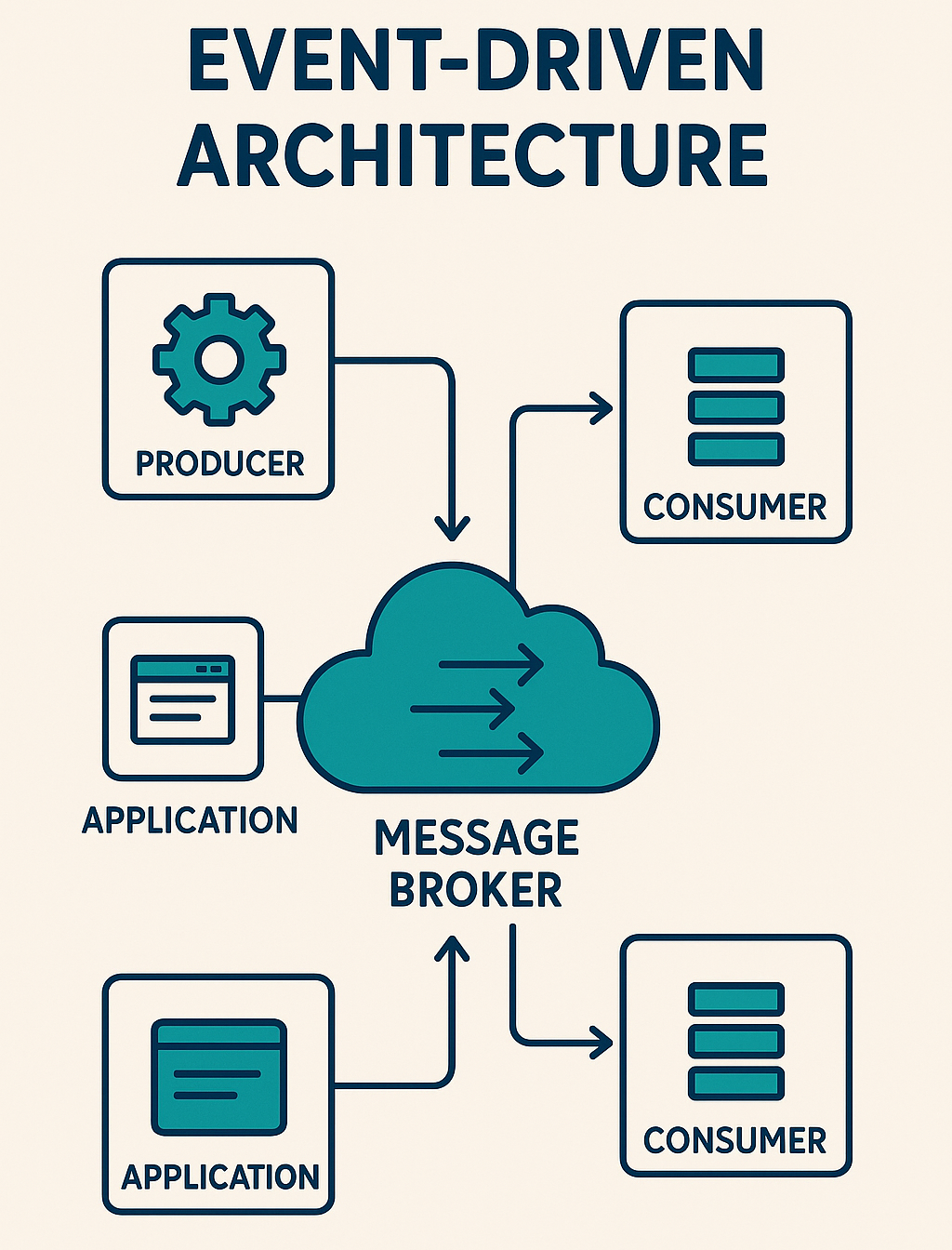
Event-Driven Architecture (EDA) is a software design pattern where the system reacts to events rather than following a predefined control flow. Events are state changes or occurrences, such as a user clicking a button, a payment being processed, or a file being uploaded.
-
This architecture is widely used in real-time applications, microservices, IoT systems, stock trading platforms, and cloud computing.
Key Concepts of Event-Driven Architecture
Events
-
An event is any significant change in the system.
-
Example - "Order Placed" "User Logged In" "Payment Processed"
Event Producers
-
Components that generate events.
-
Example - A user placing an order triggers an "OrderCreated" event.
Event Consumers
-
Components that listen for and respond to events.
-
Example - A payment service listens for "OrderCreated" and processes the payment.
Event Brokers (Message Queues / Streaming Platforms)
-
Middleware that routes events between producers and consumers.
-
Examples - Kafka, RabbitMQ, AWS SNS / SQS, Azure Event Grid.
Event Handlers
-
Services or functions that perform actions based on events.
-
Example - An email service that sends confirmation emails when an "OrderPlaced" event occurs.
Types of Event-Driven Architecture
Simple Event Processing
-
Events are produced and immediately consumed by a single listener.
-
Example - A button click triggers an alert.
Event Streaming (Pub-Sub Model)
-
Multiple consumers subscribe to events, allowing asynchronous processing.
-
Example - A "New Blog Post" event triggers notifications to email, social media, and mobile push services.
Event Sourcing
-
Stores all events in an event log instead of just storing the final state.
-
Example - A bank records all transactions as events rather than just the current balance.
Event-Driven Architecture Workflow
-
Scenario - E-Commerce Order Processing
-
Users place an order - "OrderCreated" event is published.
-
Payment Service listens - Processes payment - "PaymentProcessed" event is published.
-
Inventory Service listens - Reserves stock - "StockReserved" event is published.
-
Shipping Service listen - Ships order - "OrderShipped" event is published.
Advantages and Disadvantages of Event-Driven Architecture
- Advantages
- Disadvantages
Loose Coupling - Services communicate via events, reducing dependencies.
Scalability - Components can scale independently based on demand.
Flexibility - New consumers can subscribe without modifying producers.
Asynchronous Processing - Improves responsiveness by processing events in the background.
Real-Time Capabilities - Used in real-time applications like stock trading, fraud detection, IoT devices.
Complex Debugging - Hard to track the flow of events across distributed systems.
Event Order and Consistency Challenges - Events may arrive out of order, requiring eventual consistency strategies.
Message Delivery Guarantees - Must ensure exactly-once or at-least-once delivery using tools like Kafka or RabbitMQ.
Serverless Architecture
-
Serverless architecture is a cloud computing model where developers focus on writing code without managing infrastructure. The cloud provider automatically provisions, scales, and manages the servers on demand.
-
In this model, applications are built using Functions as a Service (FaaS) and Backend as a Service (BaaS), reducing operational overhead and improving scalability.

Key Characteristics of Serverless Architecture
-
No need to manage servers (Fully managed by cloud providers).
-
Event-driven and automatically scales based on demand.
-
Pay-per-use pricing (billed only for execution time).
-
Stateless (each function execution is independent).
Examples of Serverless Providers
-
AWS Lambda (Amazon)
-
Azure Functions (Microsoft)
-
Google Cloud Functions
-
Cloudflare Workers
-
Netlify Functions
Key Components of Serverless Architecture
Functions as a Service (FaaS)
- Developers write small, stateless functions that run on demand.
- Example - AWS Lambda, Azure Functions, Google Cloud Functions.
Backend as a Service (BaaS)
-
Uses third-party services for authentication, databases, and messaging.
-
Example - Firebase, AWS Cognito, Supabase.
API Gateway
-
Routes client requests to the correct serverless function.
-
Example - AWS API Gateway, Azure API Management.
Event Triggers
-
Functions are triggered by events like HTTP requests, database changes, or messages in a queue.
-
Example - An AWS Lambda function triggered by an S3 file upload.
Cloud Databases and Storage
-
Serverless applications use managed databases and storage solutions.
-
Example - DynamoDB, Firebase Firestore, AWS S3, Google Cloud Storage.
Serverless Workflow
-
Scenario - Image Processing in a Serverless Application
-
User uploads an image to an S3 bucket - This triggers an event.
-
AWS Lambda Function is triggered - Resizes the image.
-
Lambda stores the processed image in another S3 bucket.
-
Database update (DynamoDB) records the image processing status.
-
CloudFront (CDN) serves the processed image to users.
-
No need for managing servers or scaling manually, it all happens automatically.
Advantages and Disadvantages of Serverless Architecture
- Advantages
- Disadvantages
Cost-Efficient - Pay only for execution time. ie: No idle costs. No need to maintain or provision servers.
Auto-Scaling - Functions scale automatically based on demand. No need to configure load balancers.
Faster Development - No infrastructure management means developers focus on writing code. Easily integrates with third-party services.
Improved Reliability - Cloud providers manage fault tolerance and high availability. Functions are deployed across multiple availability zones.
Event-Driven Execution - Ideal for real-time applications, IoT, microservices, and background tasks.
Cold Start Issues - First execution of a function can be slow if it hasn't been used recently.
Limited Execution Time - Most serverless providers limit function execution time ie: AWS Lambda max 15 minutes.
Stateless by Default - No in-memory storage between function calls, must use external databases like Redis or DynamoDB.
Debugging and Monitoring Challenges - Hard to track logs and performance across distributed functions. Requires specialized tools (AWS CloudWatch, Datadog).
When to Use Serverless Architecture
- Best for
- Not ideal for
Event-driven applications. ie: IoT and Real-time notifications.
Microservices-based architectures.
APIs and backend services.
Scheduled jobs. ie: Daily reports or Automated backups.
Chatbots, background processing.
Applications needing persistent connections such as real-time gaming.
Compute-intensive workloads such as AI training or Video rendering.
Advanced Network Protocols and Proxy Tools / Network Testing
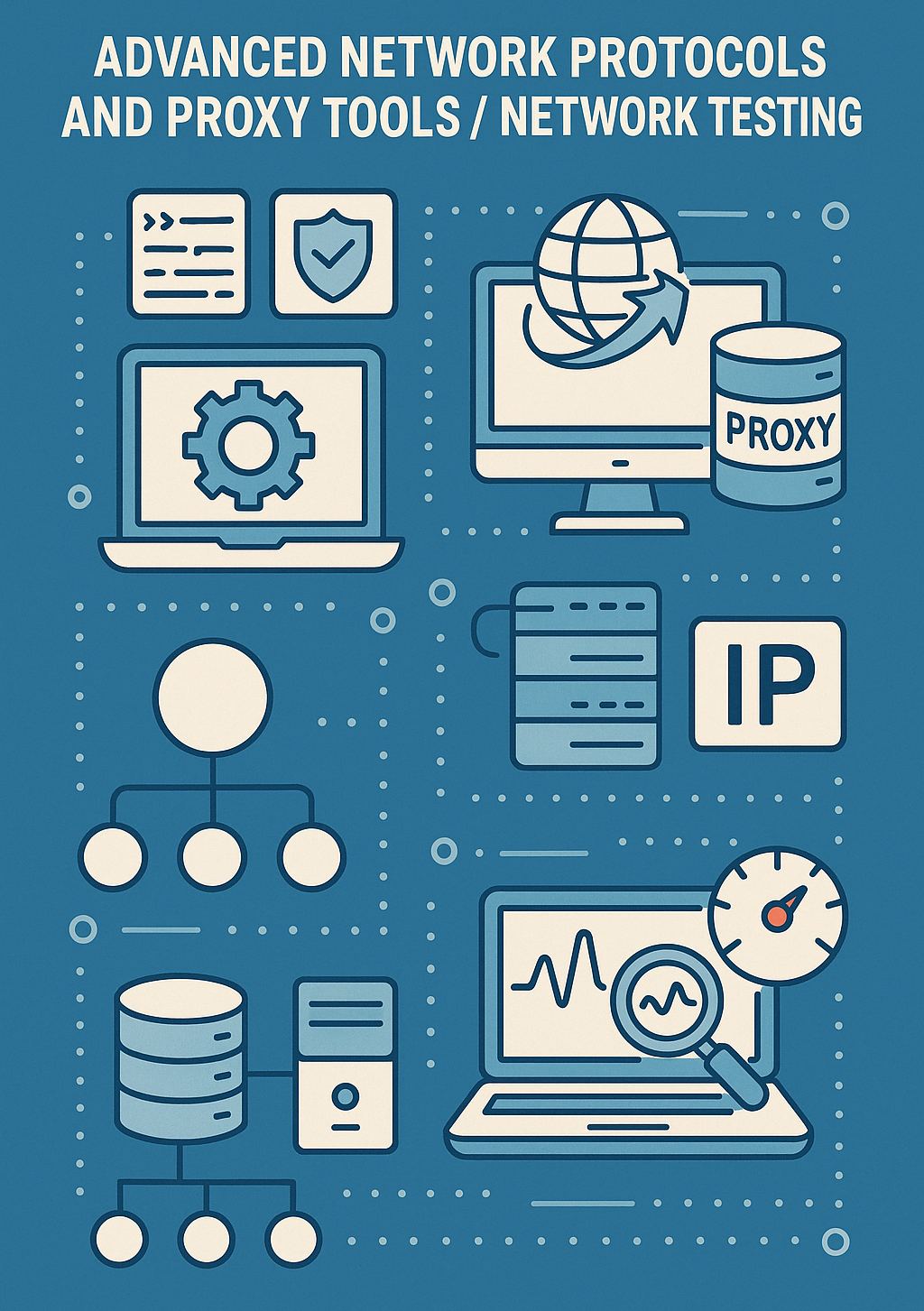
- Networking plays a critical role in communication between systems, especially in cybersecurity, web applications, and API testing. Advanced network protocols ensure secure, efficient, and scalable communication, while proxy tools help in monitoring, debugging, and testing network traffic.
Advanced Network Protocols
HTTP / 2
- HTTP / 2 improves speed and efficiency over HTTP / 1.1 by using multiplexing, header compression, and server push.
HTTP / 3
- HTTP / 3 replaces TCP with QUIC, reducing latency.
- Key Features
- Use Case
Multiplexing (Multiple requests over one connection).
Header Compression (Reduces request size).
Server Push (Preloads assets).
QUIC (for HTTP / 3) – Eliminates TCP handshake delay.
- APIs, Web applications, and Real-time streaming (YouTube and Netflix).
WebSockets
- Enables real-time, full-duplex communication between a client and server.
- Key Features
- Use Case
Persistent connection (Not like stateless HTTP).
Low latency (Ideal for real-time apps).
- Chat applications (WhatsApp Web and Slack), Stock market updates, and Multiplayer gaming.
TLS (Transport Layer Security) and DTLS (Datagram TLS)
-
TLS secures data transfer over the internet. ie: HTTPS.
-
DTLS secures UDP-based applications.
- Key Features
- Use Case
Encryption (AES and ChaCha20).
Authentication (Certificate-based security).
Integrity (Prevents data tampering).
- Secure browsing (HTTPS), VPNs, and Secure APIs.
QUIC (Quick UDP Internet Connections)
- A transport layer protocol by Google, designed to replace TCP. Reduces connection latency with zero-round-trip time (0-RTT).
- Key Features
- Use Case
Faster than TCP (Avoids handshake delay).
Packet Loss Recovery (Better than TCP).
- Google services (YouTube, Gmail), and HTTP / 3.
MQTT (Message Queuing Telemetry Transport)
- Lightweight publish-subscribe protocol used for IoT and messaging.
- Key Features
- Use Case
Low bandwidth and power-efficient.
Supports QoS (Quality of Service) levels.
- IoT devices (Smart homes, sensors, and industrial automation).
DNS over HTTPS (DoH) and DNS over TLS (DoT)
-
DoH - Encrypts DNS queries using HTTPS.
-
DoT - Encrypts DNS queries using TLS.
- Key Features
- Use Case
Prevents DNS spoofing and MITM attacks.
Enhances privacy (Hides DNS requests from ISPs).
- Secure browsing and VPN services.
Proxy Tools / Network Testing
Burp Suite
- Intercept, modify, and analyze HTTP requests, used for penetration testing.
- Key Features
- Use Case
Proxy (Intercept HTTP / S traffic).
Repeater (Manually modify and resend requests).
Intruder (Automate attacks like SQL Injection and XSS).
Spider (Crawls web applications).
- Security testing for web applications and APIs.
OWASP ZAP (Zed Attack Proxy)
- Open-source web vulnerability scanner.
- Key Features
- Use Case
Intercept and modify HTTP / S traffic.
Automated vulnerability scanning.
Fuzzing (Input testing).
- Web application security testing (XSS and SQL injection detection).
Mitmproxy
- Man-in-the-middle proxy for HTTP / HTTPS traffic analysis.
- Key Features
- Use Case
Live interception of network requests.
SSL / TLS decryption.
Python scripting for automation.
- Network debugging and security research.
Charles Proxy
- Debug API calls and HTTP / S requests for web and mobile apps.
- Key Features
- Use Case
SSL proxying (Intercepts encrypted traffic).
Simulate slow network conditions.
Modify request parameters (Headers, JSON, and XML).
- Testing API calls in mobile and web applications.
Squid Proxy
- Caching proxy for improving performance and security.
- Key Features
- Use Case
Reduces bandwidth usage via caching.
Content filtering and access control.
Can act as a reverse proxy.
- Corporate firewalls, CDN caching, and anonymous browsing.
HAProxy
- Load balancer and proxy for high-performance applications.
- Key Features
- Use Case
Distributes traffic across multiple servers.
Supports TCP and HTTP load balancing.
Failover mechanism for redundancy.
- Scalability in enterprise applications (Facebook and GitHub use HAProxy).
SOCKS Proxy (SOCKS5)
- Routes traffic through a proxy server for anonymity.
- Key Features
- Use Case
Better security than HTTP proxy.
Supports TCP and UDP traffic.
Used for VPN and bypassing geo-restrictions.
- Secure browsing and accessing geo-restricted content.
Module Review
Click to start the definition to term matching quiz
Click to start the multiple choice quiz
Score: : 0 / 17 [0.00 %]
Question 1 of 17: Which is a key component of microservices architecture?