What is CI / CD?
Continuous Integration (CI)
- Continuous Integration is the practice of automatically integrating code changes from multiple developers into a shared repository multiple times a day. Each integration is automatically verified by automated builds and tests to detect errors as early as possible.
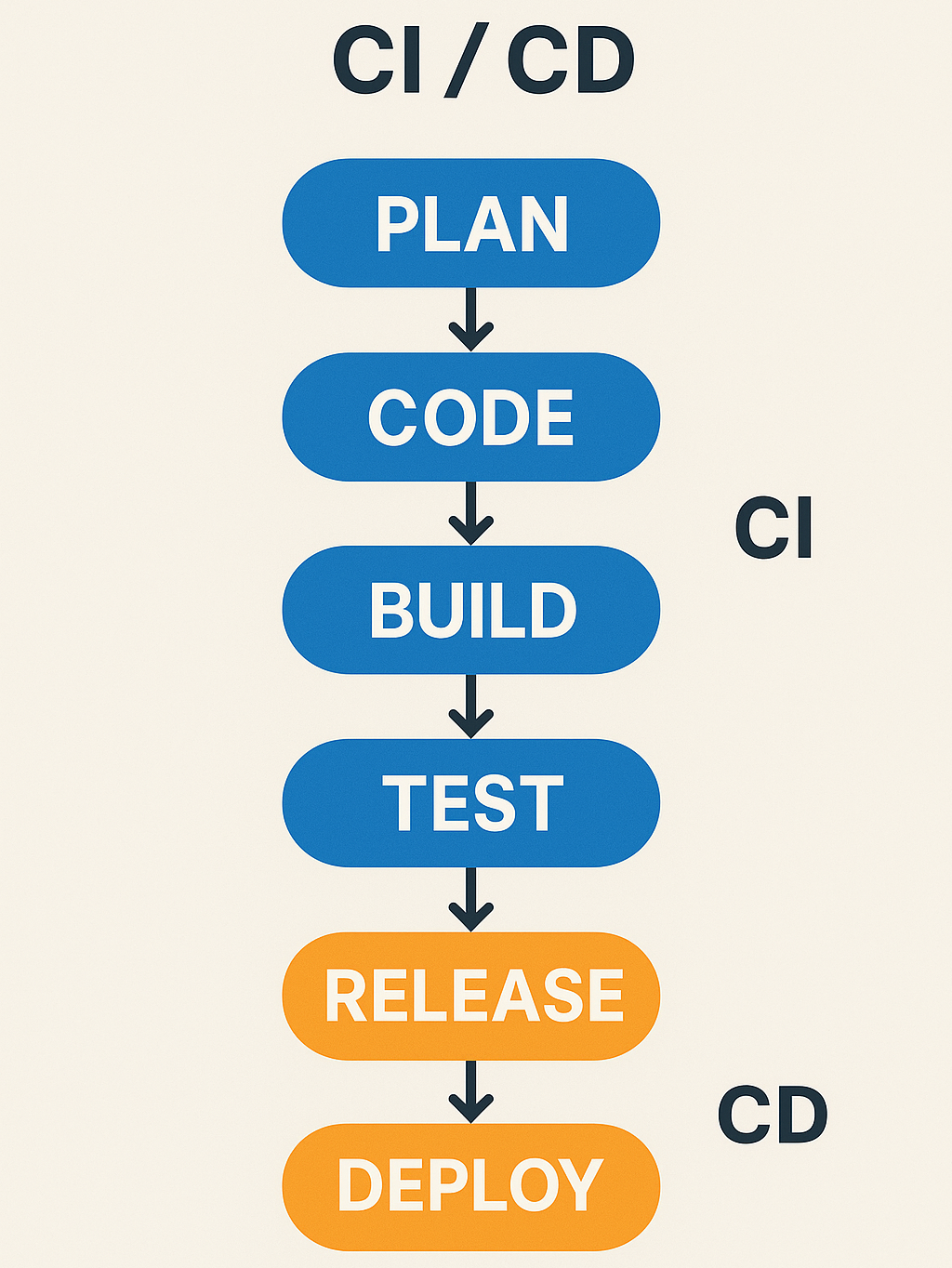
-
It involves:
-
Frequent code commits.
-
Automated build and testing.
-
Early detection of defects.
-
-
Continous Integration Workflow:
-
Developer commits code to the version control system. ie: Git.
-
A CI server ie: Jenkins, GitHub Actions or GitLab CI automatically:
-
Pulls the latest code.
-
Builds the application.
-
Runs automated tests. ie: Unit, Integration, or UI tests.
-
-
If the build or any test fails, the team is notified immediately.
-
Continuous Delivery (CD)
-
Continuous Delivery ensures that code changes are automatically prepared for release to production. It ensures that software can be deployed to production at any time, with the click of a button.
-
This involves:
-
Automated deployments to staging environments.
-
Manual approval before production deployment.
-
Ensuring the application is always in a deployable state.
-
-
Continuous Delivery Workflow:
-
Developer pushes code and triggers CI pipeline.
-
CI pipeline performs the following:
-
Runs unit and integration tests.
-
Builds the application.
-
Packages artifacts. ie: .jar, .zip, or Docker image.
-
-
CD pipeline pipeline performs the following:
-
Runs additional tests. ie: Performance or Security.
-
Prepares a Staging or UAT deployment.
-
Waits for manual approval before releasing to production.
-
-
Continuous Deployment (CD)
- Continuous Deployment extends CD by automating deployments to production without manual intervention. Every successful build that passes tests gets deployed automatically. It is the final step in the CI / CD lifecycle, after Continuous Integration (CI) and Continuous Delivery (CD). If your tests pass, your code goes live, automatically.
Continuous Delivery (CD) vs Continuous Delivery (CD)
| Feature | Continuous Delivery | Continuous Deployment |
|---|---|---|
| Automation Level | High (Up to Staging) | Full (Up to production) |
| Manual Approval | Required before release | Not required |
| Deployment Frequency | On demand ie: Daily or Weekly | Multiple times a day |
| Risk | Lower (Manual checks) | Higher (Relies on automation) |
| Best for | Regulated industries, Enterprise software | SaaS, Startups, or Consumer apps |
Jenkins for CI / CD
-
Jenkins is an open-source automation tool used to implement CI / CD pipelines.
-
It allows teams to automate:
-
Code integration
-
Build processes
-
Testing
-
Deployment
-
Key Features of Jenkins
-
Open-source and extensible with plugins.
-
Supports Declarative and Scripted Pipelines.
-
Integrates with tools like Git, JIRA, Selenium, Postman.
-
Can run tests for different environments (Dev, QA, Staging, Production).
Jenkins Pipelines
-
A Jenkins Pipeline is a sequence of automated steps defined in a Jenkinsfile.
-
It consists of:
-
Stages in a Pipeline.
-
Source: Clone the latest code from GitHub / GitLab.
-
Build: Compile and package the application.
-
Test: Run automated unit, integration, and regression tests.
-
Deploy: Deploy to a staging or production environment.
-
-
-
Types of Pipelines
-
Declarative Pipeline (Preferred): Uses structured syntax.
-
Scripted Pipeline: Uses Groovy scripting, allowing more flexibility.
Declarative Pipeline Advantages
-
Most teams prefer Declarative Pipelines because they are simpler, more readable, and easier to maintain.
-
Declarative Pipelines use a structured, YAML-like syntax that is easier to read and maintain.
-
Declarative Pipelines force a clear structure, while Scripted Pipelines allow more freedom but can become messy and harder to debug.
-
Declarative Pipeline
pipeline {
    agent any

    stages {
        stage('Build') {
            steps {
                sh 'npm install'
            }
        }
        stage('Test') {
            steps {
                sh 'npm test'
            }
        }
    }
}
- Scripted Pipeline
node {
    stage('Build') {
        sh 'npm install'
    }
    stage('Test') {
        sh 'npm test'
    }
}
- Declarative Pipelines handle failures automatically using post blocks. In Scripted Pipelines, you must manually wrap each step in a try-catch block.
post {
    success { echo 'Build succeeded! 🎉' }
    failure { echo 'Build failed! ❌' }
}
- Declarative Pipelines support parallel execution natively. In Scripted Pipelines, you must use parallel() inside a Groovy script, which is harder to read.
stage('Tests') {
    parallel {
        stage('Unit Tests') {
            steps { sh 'npm run test:unit' }
        }
        stage('Integration Tests') {
            steps { sh 'npm run test:integration' }
        }
    }
}
-
Declarative Pipelines work better with the Jenkins Blue Ocean UI, making them easier to visualize. Scripted Pipelines don’t integrate as cleanly and can make debugging harder.
-
Declarative Pipelines have built-in support for specifying agents, tools, and environment variables.
-
It is easier to assign agents in Declarative Pipelines. In Scripted Pipelines, you must do this manually.
// Declarative Pipelines

pipeline {
    agent { label 'nodejs-agent' }
}
// Scripted Pipelines

node('nodejs-agent') {
    // Custom logic needed
}
-
Use Scripted Pipelines only if you need complex logic. ie: Advanced Loops, Dynamic Stage Creation.
-
You’re working with legacy Jenkins jobs that use Groovy scripting.
The Role of QA in CI / CD
- Quality Assurance (QA) plays a critical role in ensuring software quality throughout the CI / CD process.
QA Responsibilities in CI / CD
-
Automated Testing - Write and maintain unit, integration, and end-to-end tests. Ensure comprehensive automated coverage across the testing pyramid.
-
Regression Testing - Ensure new changes don’t break existing functionality. QA plays a vital role in automating, maintaining, and monitoring regression tests as part of the pipeline.
-
Performance Testing - Validate application speed and scalability. Ensures that code changes do not degrade the system’s speed, responsiveness, or scalability. QA professionals play a central role in embedding performance testing into the automation lifecycle.
-
Security Testing - Identify vulnerabilities before deployment. Ensures that code changes do not introduce vulnerabilities or security flaws into the application or infrastructure. QA plays a growing role in shifting security left, integrating automated scans, and collaborating with DevSecOps teams.
-
Defect Reporting - Integrate test results with tools like JIRA. QA professionals are responsible for promptly identifying, documenting, and communicating issues to maintain rapid development cycles and high software quality.
-
Pipeline Monitoring - Investigate test failures and collaborate with DevOps. Ensuring that the automated processes in the pipeline consistently deliver high-quality builds and detect issues early. While DevOps manages the infrastructure, QA plays a critical role in quality visibility, stability checks, and test coverage analysis throughout the pipeline.
Types of Automated Tests in a Pipeline
Unit Tests
- Definition
- Run in pipeline
- Tools
- Check individual functions or methods in isolation. Fastest to run, critical for code correctness.
- Immediately after code is committed.
- JUnit (Java), Mocha (JavaScript), NUnit (.NET), pytest (Python).
Integration Tests
- Definition
- Run in pipeline
- Tools
- Test interactions between components, such as services, databases, or API endpoints. Ensures components work together as expected.
- After unit tests, before deploying to Staging.
- Postman, REST Assured, Supertest, TestContainers.
Functional Tests
- Definition
- Run in pipeline
- Tools
- Simulate real user interactions. User workflows and system behavior from UI or API perspective. Validates that the application works from the user’s point of view.
- After successful deployment to Test / Staging environment.
- Selenium, Cypress, Playwright, Karate.
Performance Tests
- Definition
- Run in pipeline
- Tools
- Measure system behavior under load ie: Speed, Responsiveness, and Scalability. Detects bottlenecks, slow endpoints, and resource issues.
- Post-deployment, especially before production.
- JMeter, k6, Gatling, Locust.
Security Tests
- Definition
- Run in pipeline
- Tools
- Scan for vulnerabilities ie: OWASP ZAP, insecure code, and dependency risks. Prevents known vulnerabilities from entering production.
- Static tests during build; dynamic tests post-deploy.
Static Application Security Testing - SonarQube, Checkmarx.
Dynamic Application Security Testing - OWASP ZAP, Burp Suite.
Software Composition Analysis - Snyk, OWASP Dependency-Check.
Benefits of CI / CD for QA
-
Early Bug Detection - Issues are caught before production. Bugs are found early when they’re easier and cheaper to fix. Fewer bugs escape to later stages like staging or production.
-
Faster Releases - Automation speeds up testing and deployment. Test cycles are shorter, and teams can validate and release features faster. Enables agile development, frequent feedback, and quick fixes.
-
Consistency - Reduces human error with repeatable processes. CI / CD pipelines enforce repeatable, standardized processes for building, testing, and deploying. Tests always run in the same way across all environments. Reduces It works on my machine issues.
-
Scalability - Enables efficient testing for large applications. Tests can be distributed across environments, containers, and machines. Supports parallel execution of test cases and faster feedback at scale. QA can handle more features, platforms, and devices without a proportional increase in manual work.
-
Improved Collaboration - Dev, QA, and Ops work together seamlessly. CI / CD encourages shared ownership of quality across Dev, QA, and Ops teams. Test results, build logs, and defect trends are visible to all stakeholders. This results in better alignment, communication, and accountability.
Performance Testing
- Use Lighthouse or Web Vitals to monitor, Initial page load, Lazy loading, Time to interactive and Bundle size.
Module Review
Click to start the definition to term matching quiz
Click to start the multiple choice quiz
Score: : 0 / 23 [0.00 %]
Question 1 of 23: Which statement best describes the collaboration improvement CI / CD provides?